
999Q Withdrawal Guide: How to Cash Out via JazzCash, EasyPaisa, and USDT
Anyone can talk about winning. What decides whether an app is worth keeping is what happens when you press Withdraw. This guide covers the full 999Q cash-out process in plain steps: the local wallet route, the USDT TRC-20 route, what slows requests down, and what to check before you submit.
999Q Withdrawal at a Glance
| Detail | Information |
|---|---|
| Local Methods | JazzCash, EasyPaisa |
| Crypto Method | USDT on TRC-20 |
| Minimum Withdrawal | Rs. 200 |
| Maximum per Request | Unlimited |
| Processing Time | Max 45 Minutes |
| Fees | No fee |
| Verification | Required before approval |
Before You Request a Withdrawal
A smooth payout starts before the button. Spend a minute on these checks.
Match Your Account Details
The name on your wallet should match the name on your account, and the mobile number must be correct. Mismatches cause most delays.
Check Your Balance and Bonus Conditions
Bonus money often has turnover rules. If a bonus is still active, part of the balance may not be withdrawable yet. Read the conditions in the bonus section first.
Test with a Small Amount First
A small first withdrawal shows exactly how the process feels, before a larger amount depends on it. That’s the best trust test any player can run.
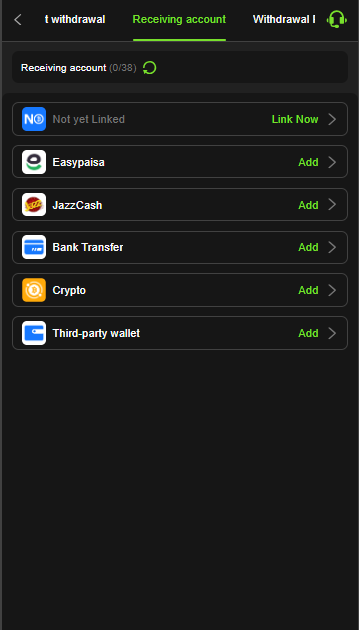
How to Withdraw via JazzCash or EasyPaisa
- Open the app and go to the wallet section.
- Tap Withdraw.
- Choose JazzCash or EasyPaisa.
- Enter the mobile number linked to your own wallet.
- Type the amount and check it twice.
- Submit the request.
- Wait for verification and approval.
- Open your wallet app to confirm the money arrived.
Tips for the Local Route
- Use only a wallet registered in your own name.
- Keep the transaction ID or screenshot of the request.
- Avoid submitting several requests for the same amount.
How to Withdraw via USDT (TRC-20)
Check that crypto withdrawals are currently available in the app before you start.
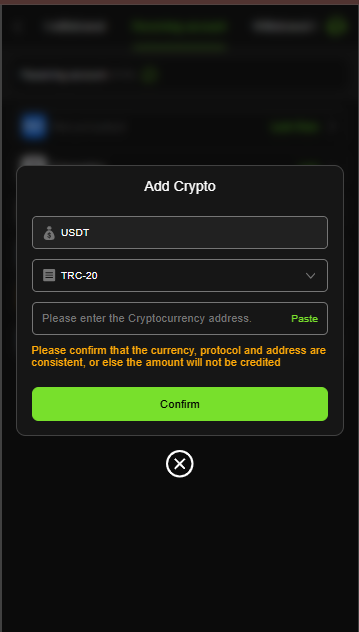
- Open the wallet and tap Withdraw.
- Choose Crypto as the method.
- Select USDT as the currency and TRC-20 as the protocol.
- Paste your own TRC-20 wallet address.
- Check the first and last characters of the address.
- Enter the amount and submit.
- Wait for verification.
- Confirm the USDT arrives in your wallet.
Crypto Safety Notes
- Choosing the wrong network, such as ERC-20 or BEP-20, usually means the funds are lost.
- A mistyped address can’t be reversed.
- Network fees apply, and they take a bigger share of small amounts.
- Make sure your receiving wallet supports TRC-20 USDT.
- Pakistan’s crypto rules are still evolving, so check the current position first.
How Long Does a Withdrawal Take?
What the Process Looks Like
The usual path is request, verification, and approval, then funds reach your wallet. Total time depends on traffic, wallet network speed, and how clean your details are.
Why Requests Get Delayed
- Wrong mobile number or wallet address
- Name mismatch between account and wallet
- Active bonus conditions not yet met
- High traffic during peak hours or holidays
- Extra verification on a first or large withdrawal
Common Withdrawal Problems and Fixes
Withdrawal Still Pending
Wait for the stated processing time, then contact support with your request time and amount.
Money Not in My Wallet
Check the wallet app’s history first. Then send support the transaction details.
Request Rejected
Usually an account mismatch or unmet bonus condition. Fix the detail and submit again.
Wrong Details Entered
Contact support immediately. For crypto, a wrong address may be unrecoverable, so double-check beforehand.
Staying Safe When Cashing Out
- Use only the official 999Q page and app.
- Never share your password or verification codes, even with someone claiming to be support.
- Ignore anyone offering “faster withdrawals” for a fee. That’s a common scam.
- Don’t withdraw to a wallet that isn’t yours.
- Treat any balance as entertainment money, not income, and only play with an amount you can afford to lose.
Contacting Support About a Withdrawal
What to Have Ready
- Your registered mobile number
- Withdrawal amount and method
- Time of the request
- A screenshot of the request or transaction ID
Where to Reach Them
Live chat suits quick questions, WhatsApp works well for screenshots, and email fits bigger cases.
FAQs
How do I withdraw money from 999Q?
Open the wallet, tap Withdraw, choose JazzCash, EasyPaisa, or USDT, enter your details and the amount, and submit.
What is the minimum withdrawal?
Check the withdrawal screen in the app Rs100.
How long does a 999Q withdrawal take?
It depends on verification and traffic. Correct details usually mean a smoother process.
Why was my withdrawal delayed or rejected?
The most common reasons are a wrong number or address, a name mismatch, or active bonus conditions.
Can I withdraw to someone else’s wallet?
No. Use a wallet registered in your own name.
Are withdrawals guaranteed?
No platform can promise this. Each request follows verification and the app’s terms.
Final Word
A good withdrawal experience comes down to small habits: correct details, a wallet in your own name, a test amount first, and a clear read of the bonus terms. Follow those, and cashing out is usually straightforward. Play within a fixed budget, and treat 999Q as entertainment.